
Every feature
All of Plume.
Nothing hidden.
Every feature in the app, on one page, with the devices it runs on. Everything here is included in both plans.
- 0features
- 3devices, one purchase
- 3languages
- 0accounts needed
Every part of the app.
One quiet place to write.
Writing
The daily page.
One entry per day, already structured. Fill one line or all of it.
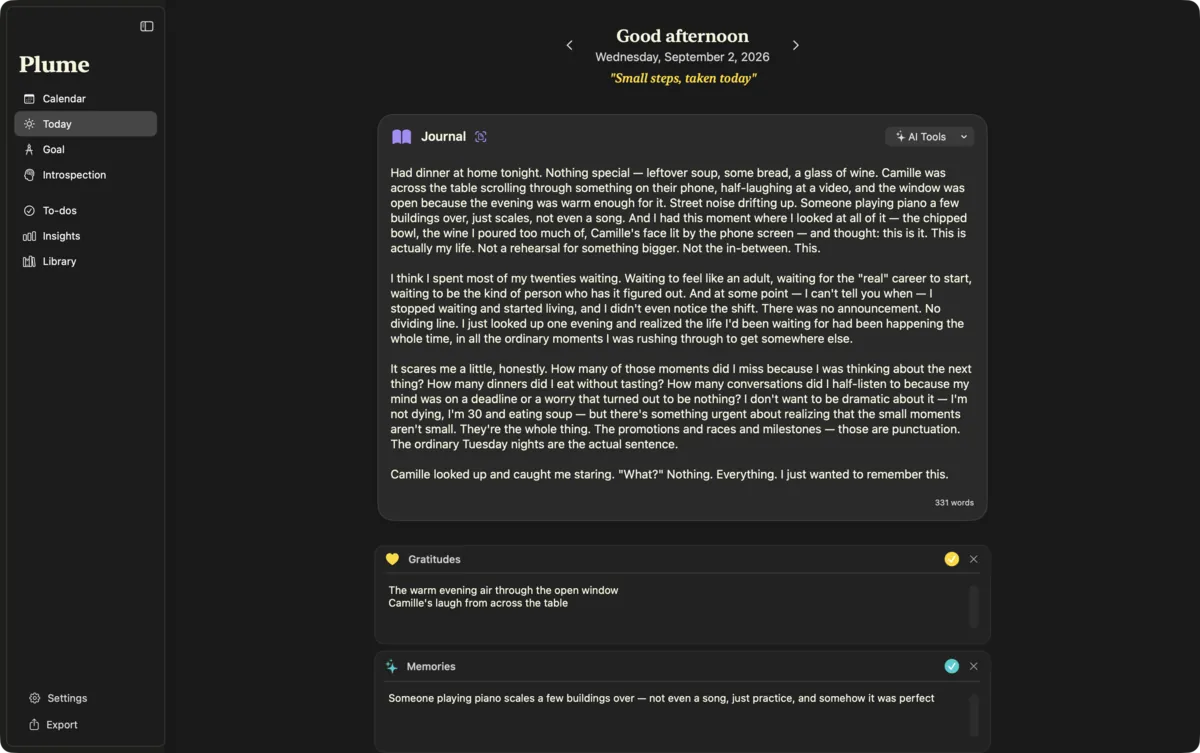
Four sections a day
A free journal, plus Gratitudes, Memories and Accomplishments, each a short list.
Dreams
An optional fifth section for what you remember from the night. Off until you turn it on.
Your own fields
Add up to six fields of your own, such as “Workout” or “Reading”, each with a name, icon and colour. Reorder them, pause them, filter the calendar by them.
Show only what you use
Hide any section you don’t need. The choice follows you to your other devices.
A greeting and a line to live by
The page greets you for the time of day, and shows your goal’s mantra, or a quote of the day when you haven’t set one.
Markdown and highlights
Bold, italics, lists and headings as you type. Wrap words in :: to highlight them.
Autosave and word count
Every word is kept as you write. No save button, no lost evening.
Scan text from a photo
Point the camera at a paper notebook, or pick a photo, and the text is recognised on your device and added to the page.
Swipe between days
Slide sideways to yesterday or tomorrow. Arrows and “Go to Today” work everywhere.
Nothing in this group is specific to that device.
Zen mode
The app disappears.
Your words stay.
A full-screen page with nothing on it but what you’re writing. More about Zen mode
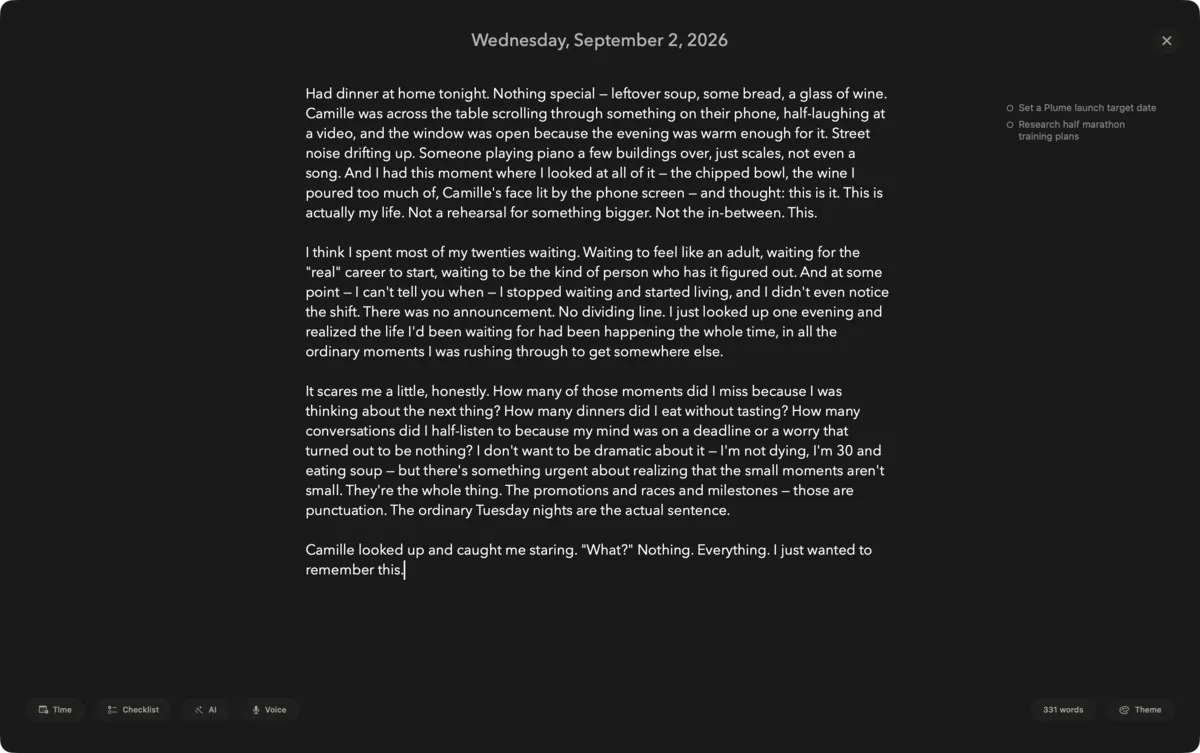
Full-screen writing
No sidebar, no counters, no distractions. On Mac, press Tab from Today to step in.
Six typefaces, three inks
Avenir Next, Georgia, Palatino, Hoefler Text, a handwritten face and Dancing Script. Full, Warm or Rich text colour, at the size you like.
Suggest a question
300 writing questions in 15 themes. Search them, or let Plume pick one at random when the page stays blank.
One year ago, three months ago
Two small pills at the edge of the page. Hover one to read what you wrote that day. Shown when the window is wide enough.
Writing tools
Insert the time ⌥⌘T, a checklist item ⇧⌘L, a bullet ⇧⌘B, or tick an item done ⇧⌘D. With a keyboard on iPad and iPhone too.
To-do from a sentence
Put the cursor on a line and press ⇧⌘T: it becomes a to-do. Apple Intelligence shortens it into a task where available.3
Today’s to-dos beside the page
A side panel on Mac, a short list on iPhone. Add one with ⇧⌘↩ without leaving the page.
Pencil mode
Write by hand with Apple Pencil. Your handwriting is recognised on the device and becomes text.
Global hotkey
⌃⌥⌘T opens today’s page in Zen from any app, ⌃⌥⌘D opens your to-dos. Record your own keys. Needs Accessibility permission.
Menu bar icon
Optional. Click to open today in Zen. Right-click to see today’s to-dos and tick them off.
Nothing in this group is specific to that device.
Voice, Siri and widgets
For the days typing
feels like too much.
Speak your entry, add a line through Siri, or check your day from the Home Screen. Voice commands
Dictation
Talk, and watch the transcript appear in Zen mode. Uses Apple’s speech recognition, on the device where supported.
Offline voice model
Download an optional Whisper model for sharper transcription that runs entirely on your device. Apple silicon Macs, iPhone and iPad.
Siri and Shortcuts
Add a gratitude, a memory, an accomplishment or a journal line without opening the app. Or say “Start voice journal”.
Writing Activity widget
A small heatmap of the last 14 or 28 days, by day or by week, in one of eight colours.
Tasks widget
Today, today plus overdue, or tomorrow. Tick tasks off right from the widget, including on the Lock Screen.
Nothing in this group is specific to that device.
Calendar and search
Months of your life.
At a glance.
Scroll back through every day you wrote, or jump straight to the one you want.
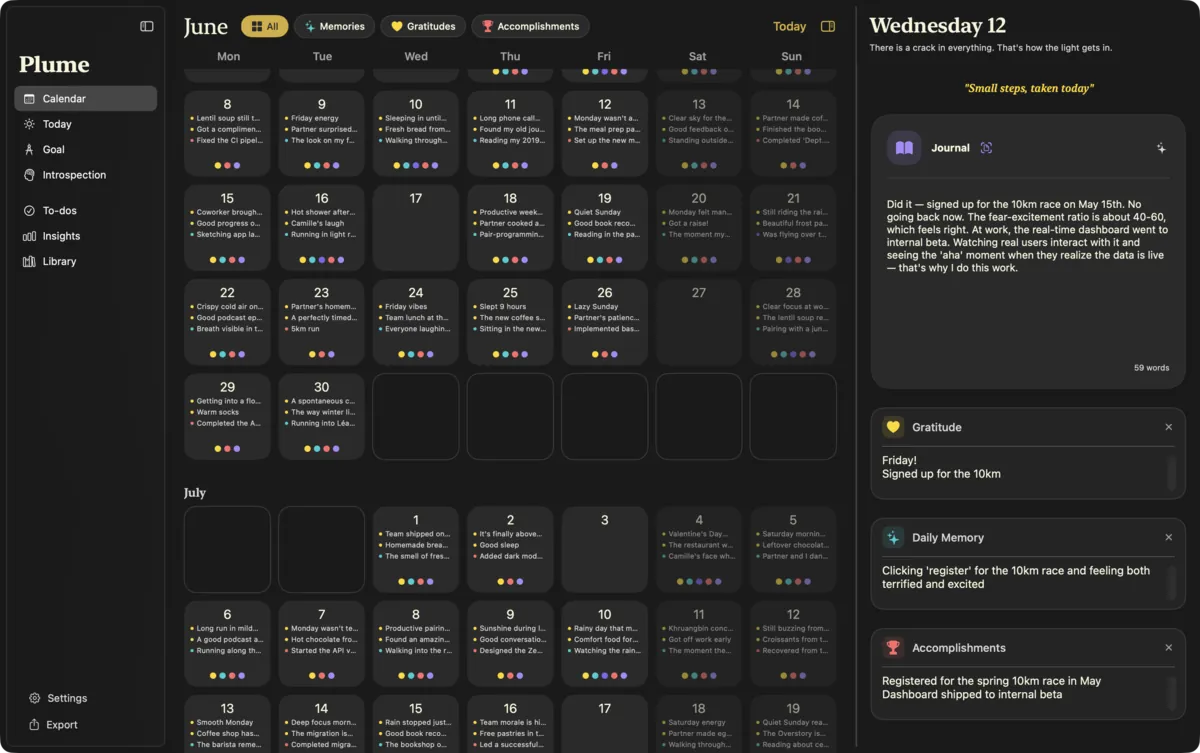
An endless calendar
Scroll through months. Each day is shaded by how much you filled in, and a trophy marks the days you got something done.
Filter by section
Show only memories, gratitudes, dreams, accomplishments, or one of your own fields.
Calendar and entry side by side
Two columns with a divider you can drag. On iPad, in landscape.
Hover to preview
Rest the pointer on a day to read its summary and journal without opening it.
Daily summaries
Optional. A one-line summary of each day, written on your device by Apple Intelligence and shown on the calendar.3
Your week, your way
Start weeks on Monday or Sunday. Erase a whole day when you need to, with a confirmation first.
Command palette
⌘K to go anywhere. Type a date the way you’d say it, “last friday” or “12 mars”, in English or French. On iPhone, under Quick actions.
On this day
From the palette, jump to the same date in an earlier year. Or to your very first entry.
Full-text search
Every word of every section of every entry, with the matching passage shown. In the palette on Mac, its own screen on iPhone and iPad.
Nothing in this group is specific to that device.
Insights
What your writing
says about your year.
Counted on your device. Pick a range: last week, month, three or six months, a year, all time, or your own dates.
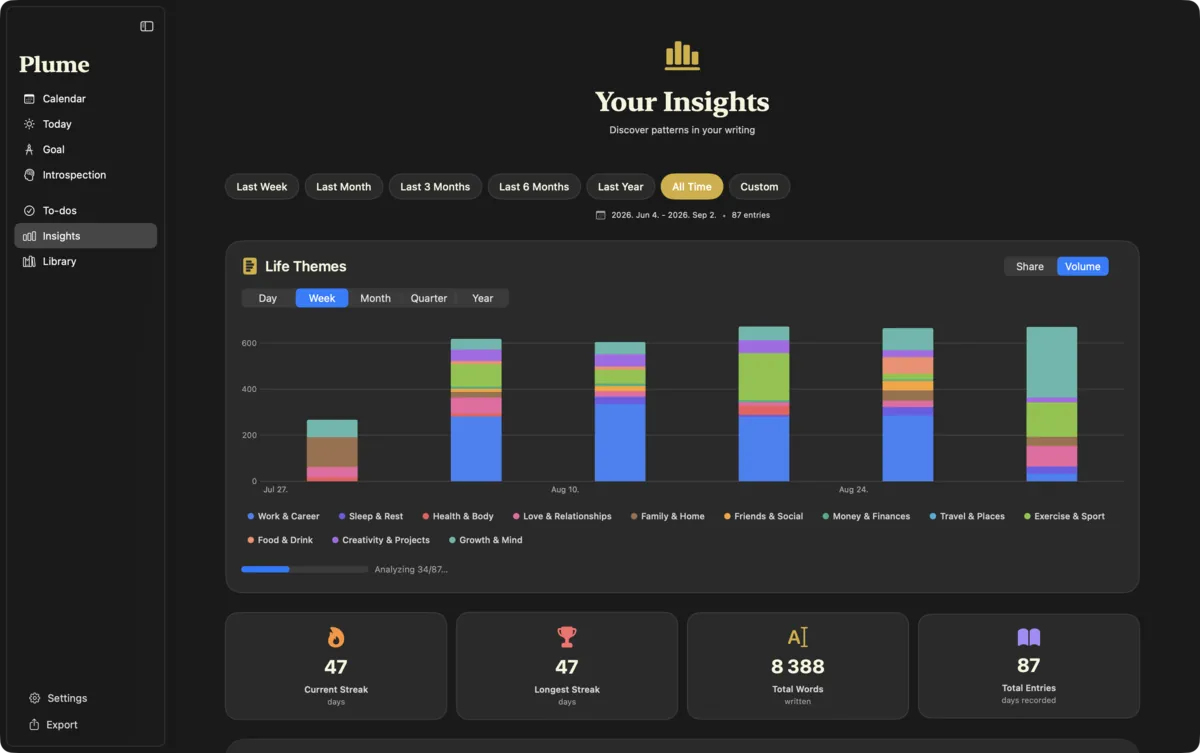
Streaks
Your current and longest run of writing days, with this week compared against last.
A year-long heatmap
53 weeks of writing, one square per day.
Word cloud
The words you keep coming back to. Tap one to see every entry that uses it.
Life themes over time
Each entry sorted into twelve themes, then charted by day, week, month, quarter or year: Work & Career, Sleep & Rest, Health & Body, Love & Relationships, Family & Home, Friends & Social, Money & Finances, Travel & Places, Exercise & Sport, Food & Drink, Creativity & Projects, Growth & Mind. Read on your device by Apple Intelligence.3
Word counts
Total words, weekly average, entry length over time, and which days of the week you write most.
Writing habits
The time of day you write, how consistent you are, how complete your entries are, and month-by-month activity.
Vocabulary and records
How rich your vocabulary is, and your personal bests: longest entry, longest streak, busiest month.
What you write about
A breakdown of your writing across journal, gratitudes, memories and accomplishments.
Nothing in this group is specific to that device.
Introspection
A coach who has read
the pages you chose.
Ask your journal a question about a period you pick, through the lens you pick. Runs on the AI provider you configure.2
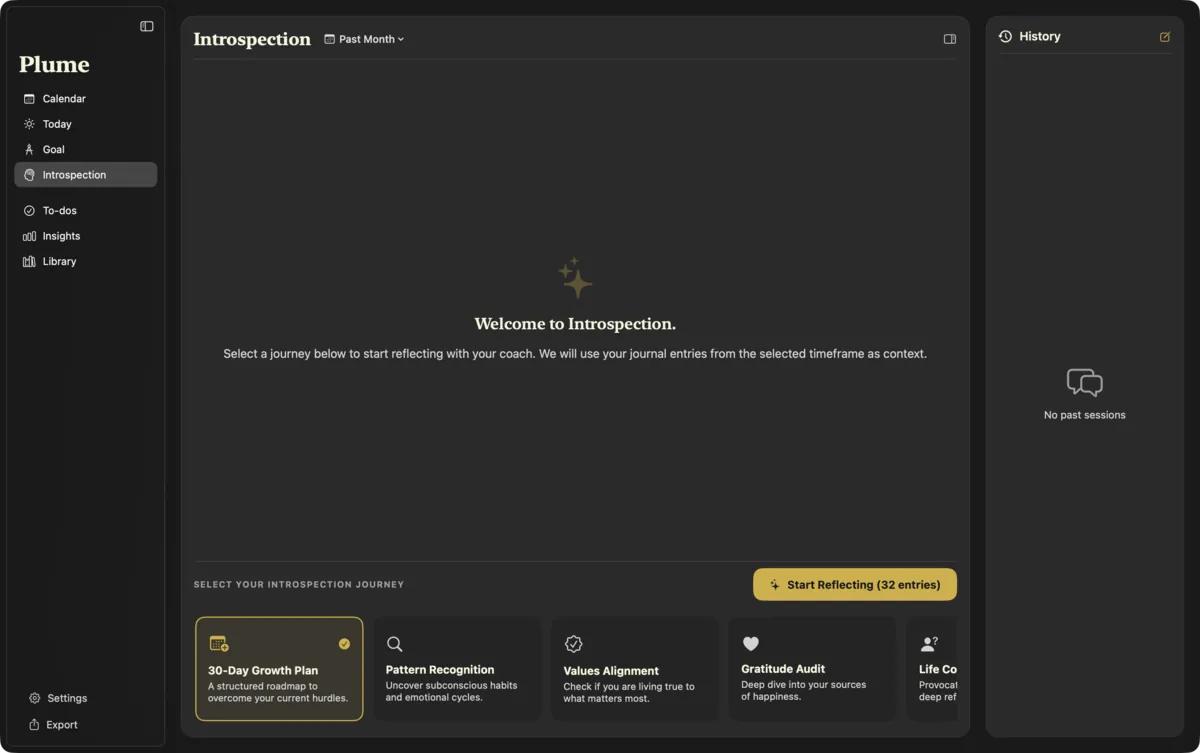
Eight lenses
- 30-Day Growth Plan
- Pattern Recognition
- Values Alignment
- Gratitude Audit
- Life Coach Session
- Decision Support
- Mental Health Check
- Productivity Audit
Choose what it reads
A week, a month, three or six months, this year, all time, or your own dates. It reads up to the 40 most recent entries in that period, and nothing else.
Your goal comes along
Include your current goal, and every answer is weighed against it.
Follow-up questions
Push back, ask why, go deeper. Answers stream in as they’re written, with the model’s reasoning when it shares it.
History
Every session is kept on this device. Reopen one next month and see what changed.
From advice to action
Turn the coach’s suggestions into to-dos in one tap, or copy the answer.
Read aloud
Listen to the answer in the system voice, or download a more natural voice that runs on Apple silicon.
Nothing in this group is specific to that device.
AI, your choice
Off by default.
Yours to switch on.
Plume starts in Full Privacy Mode. If you turn AI on, you choose where it runs: on your device, on your Mac, or with a provider you pick.
Full Privacy Mode
On from the first launch. Every AI feature is hidden until you decide otherwise, in onboarding or in Settings.
Apple Intelligence
No key, no account. Daily summaries, life themes and to-do shortening, on your device.3
Shake for a summary
Shake your device to summarise your day, or to fill in memories and accomplishments from what you wrote.3
Bring your own key
OpenAI, Claude, Gemini, Grok or Mistral. Your key stays in your Keychain, and the connection is tested before it’s saved.2
Your own model
Any OpenAI-compatible endpoint, such as Ollama, LM Studio or your own server.
One-click local AI
Plume finds Ollama, LM Studio or llama.cpp running on your Mac and connects to it. On an empty Ollama, it offers a starter model sized for your Mac’s memory.
AI tools in the editor
Improve the wording, get a book or podcast suggestion, or highlight the key phrases. On a selection or the whole entry. Edit each prompt to taste.
Export for any chatbot
Copy a period of entries with one of 13 analysis prompts attached, ready to paste wherever you like.
Nothing in this group is specific to that device.
Library
For the nights
you don’t know where to start.
Rituals you repeat, and journeys you follow one step a day. The questions land in today’s page on their own.
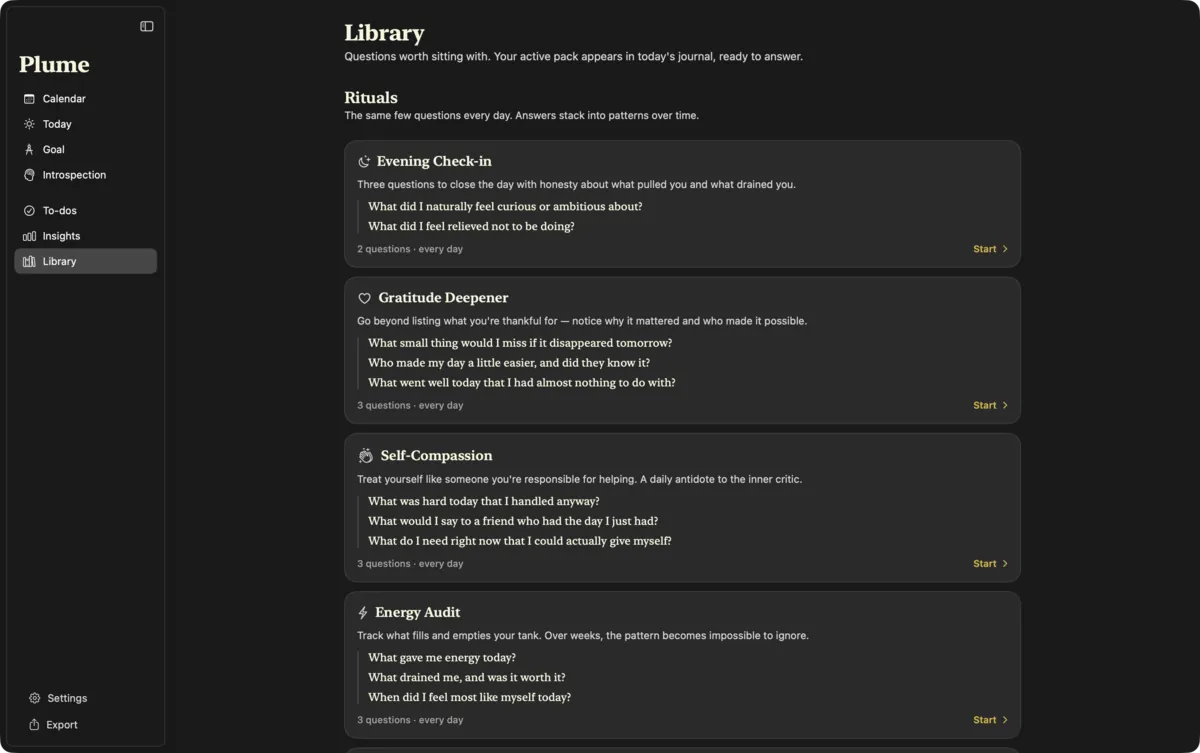
9 rituals
Three questions, every day.
- Evening Check-in
- Gratitude Deepener
- Self-Compassion
- Energy Audit
- Connection
- Stoic Evening
- Presence
- Daily Growth
- Everyday Creativity
12 journeys
One question a day, and a small action to try. Skipping a day never skips a step.
- Self-Confidence · 7 days
- Creative Spark · 7 days
- Meeting Your Future Self · 7 days
- Mental Health Reset · 10 days
- Money Mindset · 10 days
- Values Discovery · 10 days
- Career Clarity · 14 days
- Deeper Relationships · 14 days
- Life Transition · 14 days
- Letting Go · 14 days
- Burnout Recovery · 21 days
- Habits That Stick · 21 days
Make the questions yours
Reword a question, skip it, or reset it to the original.
Every answer, side by side
See all the times you answered the same question, and how the answer moved.
Progress that follows you
Your active ritual or journey, and where you are in it, sync across your devices.
Nothing in this group is specific to that device.
Goal and to-dos
Something to aim at.
Somewhere to put the rest.
Your goal at the top of the page, and to-dos tied to the day they belong to.
A goal with a mantra
A short line you see every day, the details behind it, and an icon. The coach can read it too.
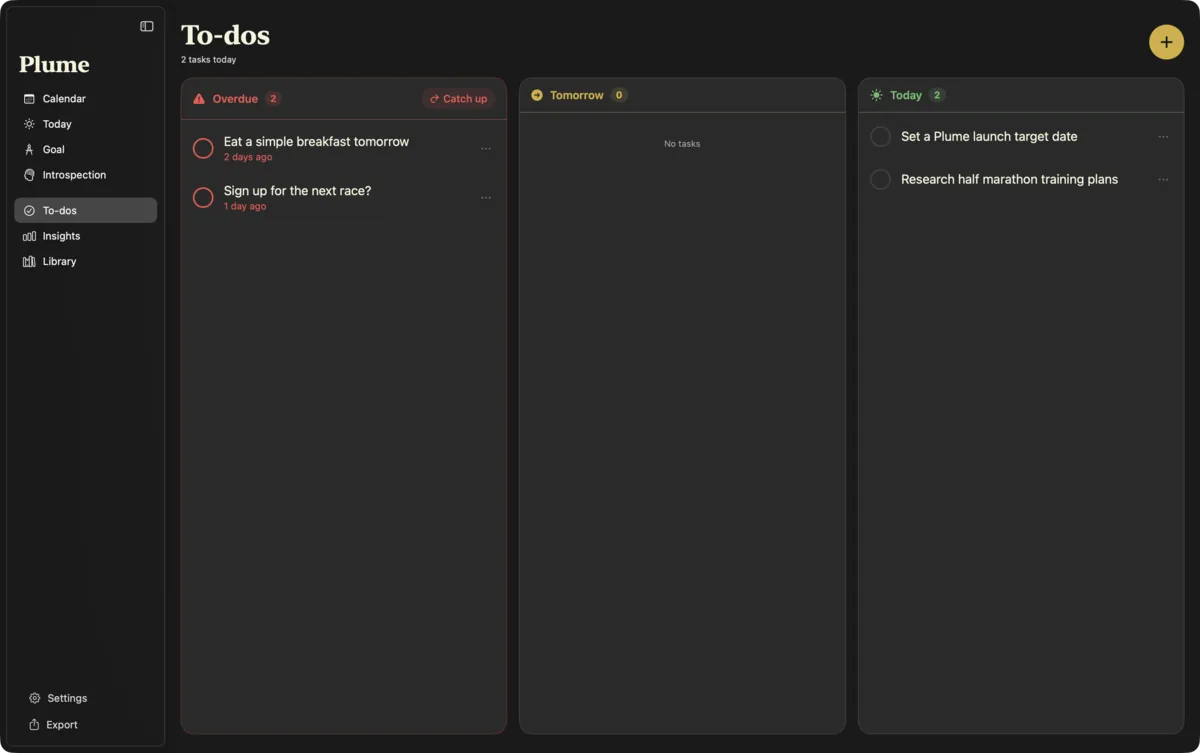
To-dos by day
Overdue, Today, Tomorrow, Upcoming, and what you finished this week. “Catch up” brings everything overdue to today.
A board you can drag
To-dos as columns. Drag a task to another day. On iPhone, a simple list.
Paste a list
Paste several lines and get several to-dos. Move, edit, delete, and undo with ⌘Z.
Apple Reminders and Todoist
Send one task or all of them to Reminders, or to Todoist when it’s installed.
Work Timeline
For developers, opt-in. Pick a folder of git repositories and add the day’s commits to your accomplishments. Read locally.
Nothing in this group is specific to that device.
Privacy and sync
Locked on the device.
Sealed before it leaves.
No account, no Plume server, nothing to read your journal on. How the privacy works
Face ID, Touch ID, Optic ID
Plume opens only for you, with your device passcode as a fallback. “Lock now” from the command palette when you step away.
Encrypted on disk
Each part of every entry, and every to-do, is encrypted with AES-256-GCM. The key lives in your Keychain.
Encrypted iCloud sync
Optional. Entries are sealed on your device with ChaCha20-Poly1305, using a key derived from a passphrase only you know, then stored in your private iCloud database.1
Sync that keeps up
Every five minutes, after each change, and when another device pushes one. Entries, to-dos, your goal and your fields. ⌘R to sync now.
No account, no trackers
No sign-up, no analytics, no ads. The App Store privacy label reads “Data Not Collected”.4
AI waits to be asked
Nothing is sent anywhere for AI unless you turn it on, choose a provider, and confirm that your text will be sent.2
Nothing in this group is specific to that device.
Import and export
Bring your past.
Leave whenever you like.
Free, forever, whether you buy or not.
Import from Day One
From a Day One JSON export, with dates, times and time zones intact. Tags, places and stars are kept as a note. Plain-text exports work too.
Import a folder of notes
A folder of .txt or .md files, dated by their file names. Or simply paste text in.
You decide on clashes
When an imported day already has an entry, choose how to handle it.
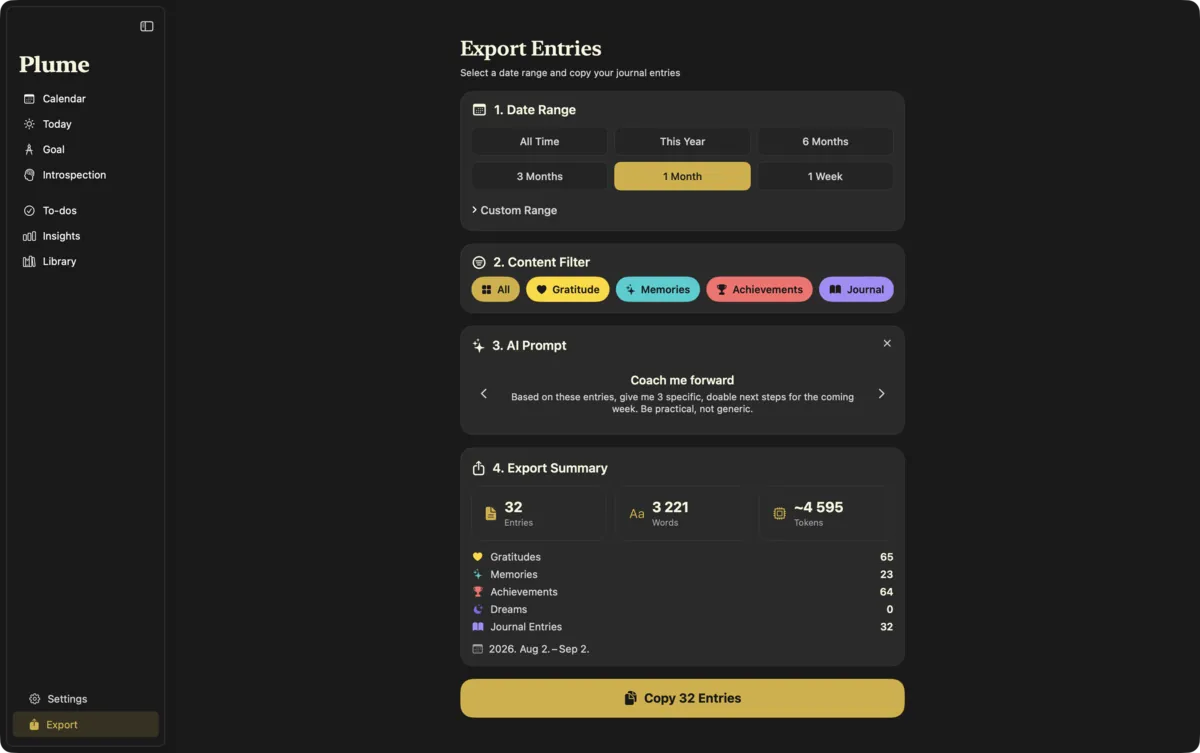
Copy as text
Pick a period and the sections to include, and copy it all as plain text.
Backup file
Save your entries and to-dos to a passphrase-protected .plume file. Restore by merging, newest wins, or by replacing everything.
Nothing in this group is specific to that device.
Made for each device
Feels at home
wherever you write.
Nine themes, three languages, and the details each device deserves.
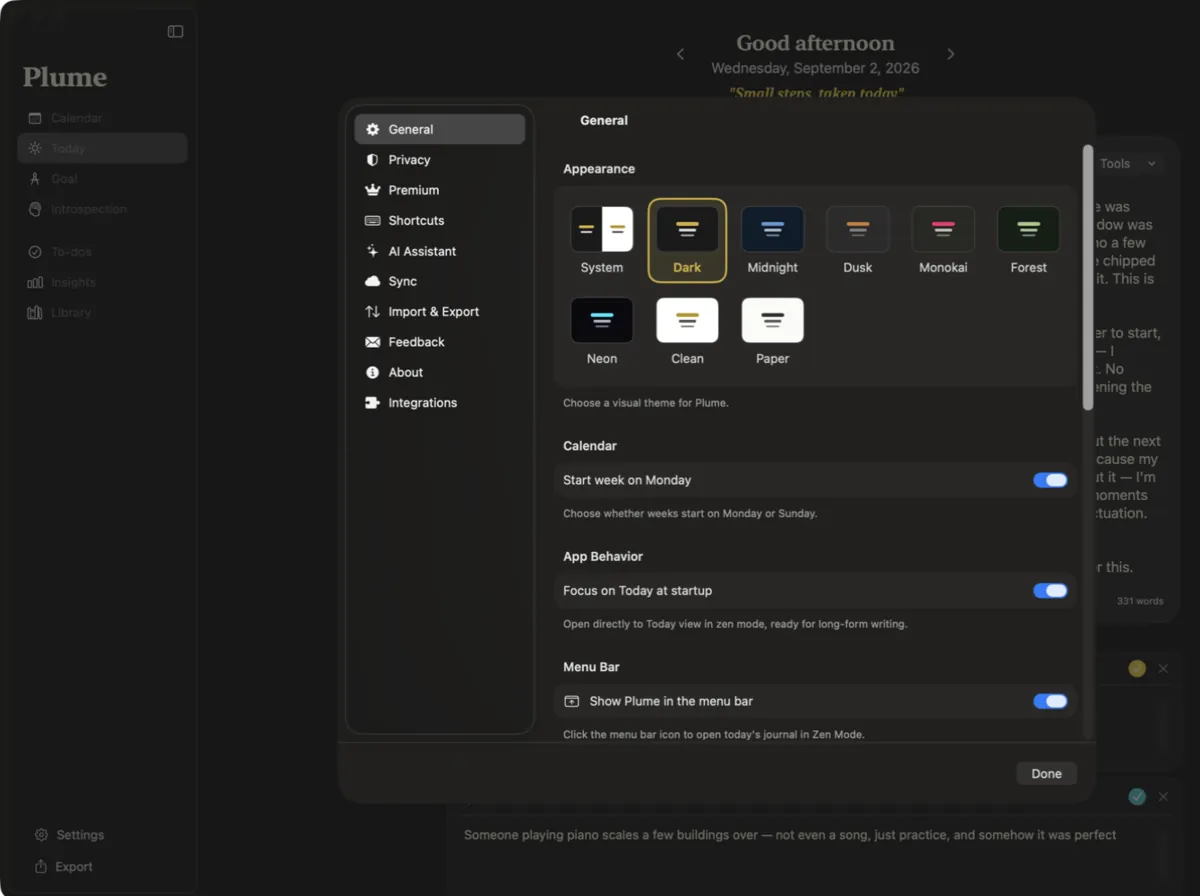
Nine themes
System, Dark, Midnight, Dusk, Monokai, Forest and Neon. Or Clean and Paper, for light.
English, French, Spanish
Switch the app’s language from Settings, whatever your device is set to.
Keyboard first
⌘1–⌘9 to move between sections, ⌘K, ⌘R, ⌘,. Hold ⌘ to see every shortcut on the current screen.
Sections in their own windows
Double-click a sidebar item to open it in a window of its own.
Keyboard on iPad
Hardware-keyboard shortcuts throughout, every orientation, and the Library in the tab bar.
One hand on iPhone
A tab bar at the bottom, swipe between days, pull down to sync, and gentle haptics.
Nothing in this group is specific to that device.
Trial and plans
Every feature above.
In both plans.
Plume Yearly or Plume Lifetime unlock the same app, and every future feature. See pricing
21 writing days, free
Every feature unlocked. Only the days you write count, so a busy week never eats your trial. No card needed.
One purchase, three devices
Buy once on any device signed in to your Apple Account, and it covers Mac, iPad and iPhone. Restore any time.
Never locked out
If the trial ends or you stop paying, Plume turns read-only. Read, search, sync, see your insights and export, forever.
Nothing in this group is specific to that device.
That’s all of it.
Now it’s your turn.
Download Plume free on Mac, iPad or iPhone, and write tonight’s entry.

Free for the first 21 writing days. No account, no card.